By Gullik Killie, co-founder of Laup. Published .
This guide explains what an AI visibility tool measures, how AI engines find the sources their recommendations rest on, and why Laup has four parts: dashboards to understand, a scanner to check the site, action cards to act and measure, and an MCP server to dig further. Most figures in the examples come from measuring our own site, laup.ai; the sources example is from a customer.
What AI visibility means in practice
When someone asks ChatGPT, Gemini, Copilot or Claude what to buy, they get one answer with a few names in it, not ten links to choose from. AI visibility is how often your business is among those names. In Laup the figure is the share of answers to your buying questions that name or cite you, counted among the answers that name at least one business. Questions that already contain your brand name are left out, because they would give you a full score you did not earn.
We keep three things apart: being named in the answer text, being cited with a link, and being found, meaning the web search the engine ran returned your site. They have different causes and different fixes. An engine that searches without finding you cannot name you from that search.
In our own measurements, found and named go together almost every time. On the Norwegian questions “verktøy for AI-synlighet” and “software for synlighet i KI”, Laup was named in 20 of 248 answers between 10 September and 10 October, and all 20 had laup.ai in their search results. Between 25 September and 9 October, Gemini named Laup in 49 of the 53 answers where it had retrieved laup.ai. Being found is the bottleneck. The wording on the page matters most once the engine has found it.
How AI engines find their sources
The engines answer from what the model learned in training and, when they search, from the pages the search brings back. Each engine searches its own search engine, so you can be visible in one and absent from another.
- ChatGPT: Searches OpenAI's own web search
- What it means for you: No submission. The page has to be readable by OpenAI's search crawler.
- Copilot: Searches Bing
- What it means for you: Bing Webmaster Tools and IndexNow decide how quickly Bing reads the page.
- Gemini: Searches Google
- What it means for you: Google Search Console. The page has to rank for the words Gemini searches with.
- Claude: Searches Brave Search
- What it means for you: Brave has its own form for submitting pages.
| Engine | Searches | What it means for you |
|---|---|---|
| ChatGPT | OpenAI's own web search | No submission. The page has to be readable by OpenAI's search crawler. |
| Copilot | Bing | Bing Webmaster Tools and IndexNow decide how quickly Bing reads the page. |
| Gemini | Google Search Console. The page has to rank for the words Gemini searches with. | |
| Claude | Brave Search | Brave has its own form for submitting pages. |
The language of the search also decides which pages come back. On the two Norwegian questions above, between 26 September and 10 October, 72 of Copilot’s 81 searches were purely English, and its answers were built on English sources and global tools. Gemini mostly searched in Norwegian, close to the wording of the question, and found us. Claude searched in Norwegian about half the time and then got Norwegian comparisons and guides back. If you sell in more than one language, measure each one: the same question can get a different answer and different sources in each.
Buying question
Where should I buy a robot vacuum?
Answer context
Learned knowledge
Patterns and information the model already carries.
Live web search
Pages retrieved into the model's context while it answers.
Final answer
The answer may name you, cite you, recommend someone else or leave you out entirely.
What Laup records
- The answer
- The full response from each engine
- Mentions and citations
- Who is named and who is cited
- Grounding sources
- Pages retrieved into the answer context
- Reasoning and web searches
- Reasoning summaries and search queries the engine exposes
Four parts, four jobs
Laup is built around one workflow. Each part of the product exists because one of its steps lacked a tool:
Understand where you lose, by engine, category and question. That is the dashboards.
Check that AI can read the site. That is the scanner.
Pick an action with evidence behind it, and move it to Measuring once it is done. That is the action cards.
Dig further and carry it out with your own AI assistant. That is the MCP server.
Dashboards: understand where you lose
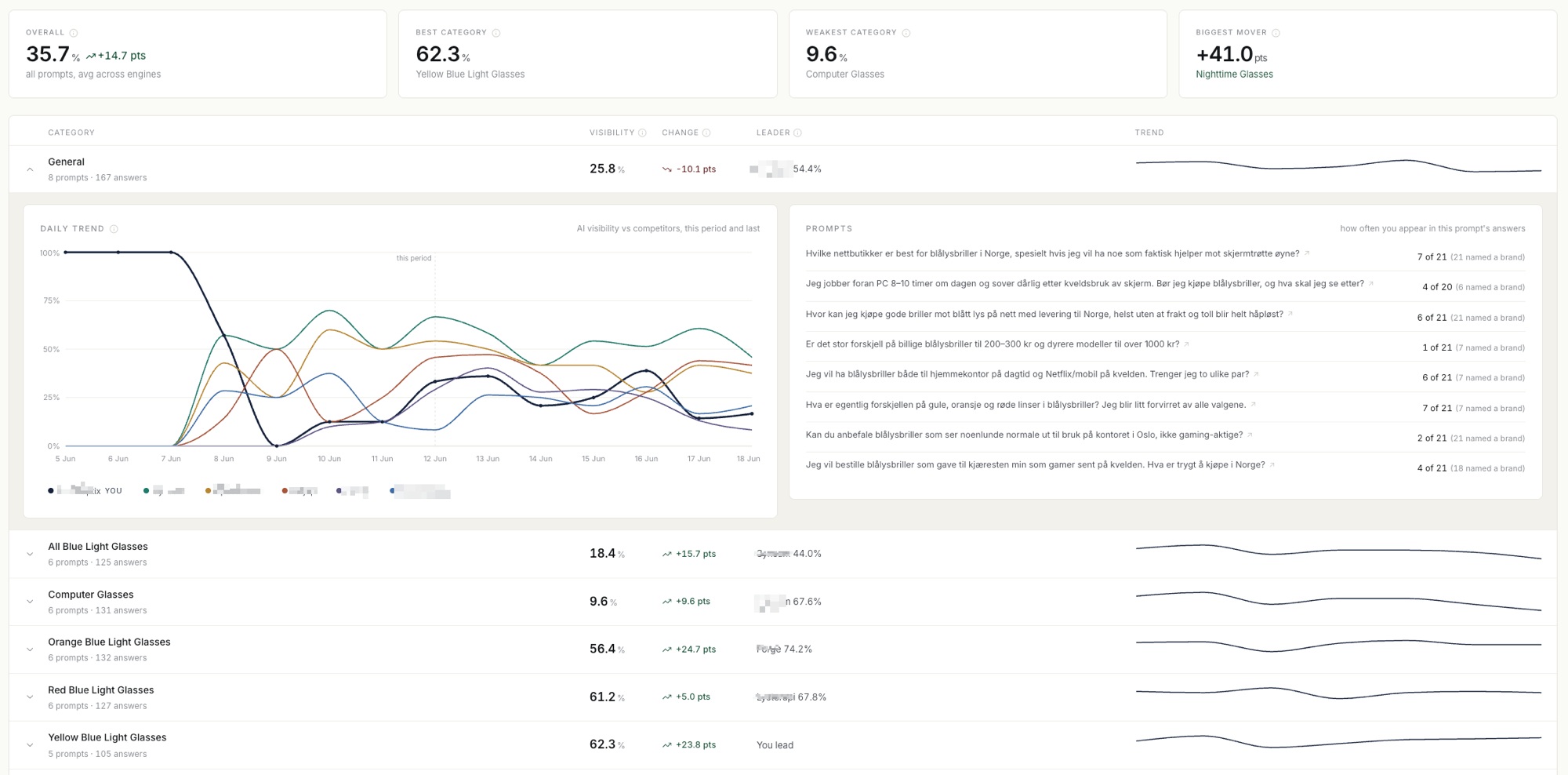
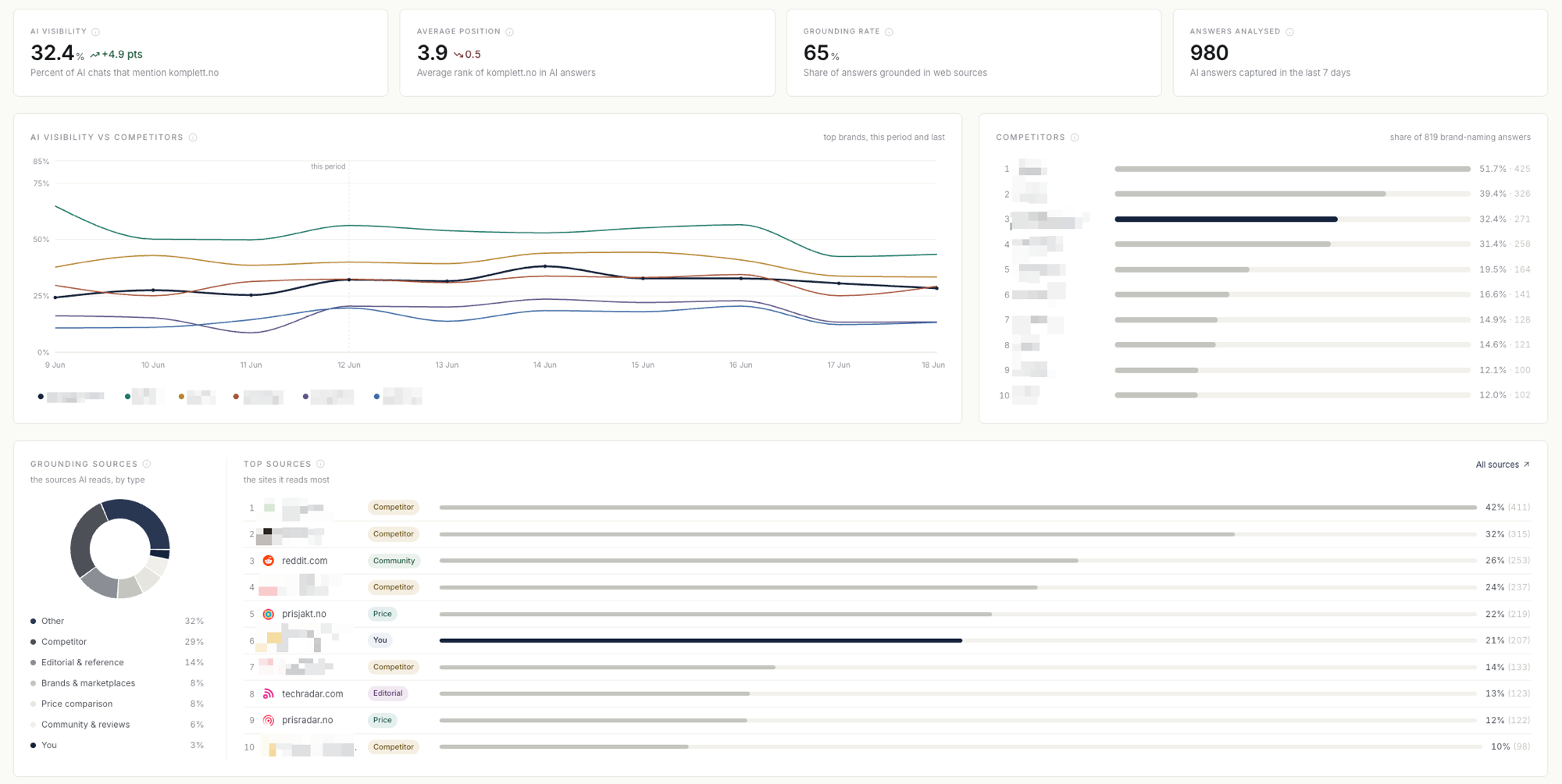
Every day Laup asks the engines your buying questions and stores the whole answer: who was named, in what order, which sources the engine read and what it searched for. The dashboards slice that so you see where you lose, not only that you lose.
- Per engine, weighted equally
- When we pooled every answer, the engine with the most answers drowned out the rest. The difference between engines is often the insight itself, so each engine is counted on its own before they are weighted equally. Each engine also gets a funnel: searched the web, named you, linked to you.
- Per category
- One score for the whole site hides where you lose. You can do well on general questions and be missing from the category that matters most for sales, so the category is the unit we measure in.
- Per question
- Every answer can be opened to show its text, mentions, citations and the searches the engine ran. The spread between questions shows whether the problem is the market or the question itself.
- Competitors from the answers
- Laup finds the businesses AI names beside you, without you setting up a competitor list first. You can mark each one as a competitor, a partner or not shown.
- The sources behind the answer
- Grounding sources are sorted by type: your own site, competitors, price comparison, brands and marketplaces, community and reviews, and editorial. You also see pages the engine read without naming you. That is often where an action should start.
- Events on the timeline
- For a long time the chart showed what happened, never why. Actions, question changes and engine changes are now marked on the timeline, so a peak can be tied to what happened that week.
The scanner: check that AI can read the site
The scanner answers a different question from the dashboards: can AI read your site at all? It is free, needs no sign-in and usually takes under a minute.
- Raw HTML against a real browser
- The scanner fetches up to ten pages from your sitemap twice, once as raw HTML and once in a browser, and compares text, headings, images, structured data and tables. Many crawlers do not run JavaScript, so content that only appears after rendering can be invisible to them. That gap is why we built the scanner.
- Access for AI search
- It reads robots.txt for 14 bots. The rules for AI search bots and for the bots that fetch pages while a user waits, such as OAI-SearchBot, Claude-SearchBot and ChatGPT-User, count towards the score. Training bots such as GPTBot are shown but not scored: blocking them is a choice about training, not an error.
- Product data
- Product schema (Schema.org/Product) is checked against ten fields, including price, availability, brand, GTIN and ratings. Markup that only exists after JavaScript runs is flagged as something to render on the server. Sites that sell nothing online get product data marked as not applicable instead of zero.
- Sitemap and llms.txt
- Within the discoverability check, the sitemap and its lastmod dates carry most of the points, because that is how search engines learn what is new. llms.txt is worth only a few points, because few engines use it today. Visible content and product schema carry the most weight in the total.
The scanner would rather say “we could not read this” than give a wrong score, and it does not measure whether AI recommends you. The dashboards do that. Try it on the AI readiness scan, or read the scanner methodology.
Action cards: what to do, and whether it worked
Measurement without action becomes a report nobody opens again, and action without measurement is guessing. The action cards connect the two: each card says what to do and why, and when you move it to Measuring, Laup starts measuring whether it helped.
- The plan is built on your own data
- The plan reads 30 days of answers, the searches the engines ran, how the engines titled your pages and the latest scan. Three models propose actions independently, and a separate review pass merges their proposals. The models choose what a card points at; the numbers on the card are computed by code from the data, so a card cannot make up a number.
- Few cards, with evidence
- The first version ranked every gap in the data and gave one large retailer 203 cards. Nobody can work with that, so we removed it. Each card now carries its evidence, exactly what you change, and how hard the change is and who controls it.
- Priority, not a forecast
- The number from 0 to 100 ranks the cards against each other by how confident the models are, how strong the evidence is and how many of them agree. It is not a predicted lift.
- Measurement starts when you move the card
- Cards move from Recommended through Planned and In progress to Measuring and Done. When a card moves to Measuring, the 14 days before are frozen as the baseline, and the result updates with every run, per engine and per question. You can set the date the change went live, up to 30 days back, because many people move the card a few days after the change is out.
- Observation, not proof
- Engines re-read sites at their own pace, and answers given from the model's memory can take a long time to move. The card therefore shows what happened after the change, not that the change was the cause.
- A dismissed card is an answer too
- If you dismiss a card with a reason, the reason is taken into account when the next plan is made. A new plan can be made once every 28 days.
This is what it looks like on our own site. The titles of our pages were invisible to most crawlers, so we fixed them and followed two cards for 13 nights. The actions you can choose from are described on AI Optimization.
MCP: dig further and carry it out
The dashboards answer the questions we anticipated. The rest has to be dug out, and an AI assistant with access to the data does that faster than any menu. That is why Laup has an MCP server: it connects your own AI assistant to the same data you see in the app.
- The same numbers as the app
- The server has 16 tools: 13 that read (visibility per engine and question, the full answers, the sources, the searches the engines ran, the scan and the action cards) and three that write (comment, create an action and move a card).
- Where you already work
- It works in ChatGPT, where Laup is in ChatGPT's directory, in Claude as a custom connector, and in coding tools such as Claude Code, Codex, Cursor and Gemini CLI.
- You carry out the change
- Laup does not change your site. Your agent makes the change with the tools and permissions you give it, and moves the card to Measuring once the change is out.
- Traceable
- Every change an agent makes in Laup carries the agent's name, and your team can move a card back or dismiss it. Connecting needs an active trial or subscription.
The Norwegian version of this page is an example. Card #27 said Laup was rarely named for “verktøy for AI-synlighet”. Claude read the card and the engines’ searches through the MCP server, found that the word “KI” was nowhere on the page, and Claude Code wrote the change the same evening. The whole process is in How we work: a practical example. Read more about connecting on AI Agents.
What to look for in an AI visibility tool
Whichever tool you end up with, these are the questions that separate them:
- Which engines, and how they are measured
- Through the APIs or through the consumer apps, and which engines are in the plan you actually buy? Laup measures through the APIs with web search switched on.
- Your own questions, in your language
- Buying questions phrased the way your customers ask, in your market. The engines answer differently in different languages, so Laup tracks each market and language separately.
- How often
- Daily, weekly or less often, and whether every question runs every time. One answer a night is a small sample; the trend over two weeks is what counts.
- Named, cited and found separately
- One combined score does not tell you whether you are missing from the search or from the answer, and the two have different fixes.
- The sources and searches behind the answer
- Without them you know that you lose, but not why.
- Measuring effect
- Can the tool show what happened after a change, per engine, with a clear before and after?
- Access to the data
- Export, API or MCP, so you can keep working in your own tools.
What it costs
Basic costs NOK 990 a month for 20 questions and up to 3 categories, measured in ChatGPT, Gemini and Copilot. Plus costs NOK 2,290 a month for 50 questions and up to 5 categories. Pro costs NOK 3,990 a month for 100 questions and up to 10 categories. Agencies buy packs of 100 questions at NOK 4,990 a month per pack. Prices exclude VAT. Claude can be included in a custom plan. The trial lasts 14 days and needs no credit card. See the details on pricing.
Frequently asked questions
Which AI engines does Laup measure?
Basic, Plus and Pro measure ChatGPT, Gemini and Copilot. Claude can be included in a custom plan. Everything is measured through the engines' APIs with web search switched on, not through the consumer apps, and Copilot is measured as a GPT model that searches Bing.
How often is visibility measured?
Every day. Each question is asked of each engine in your plan, and the whole answer is stored, so you can open it and see who was named, which sources the engine read and what it searched for.
Do I need a competitor list to get started?
No. Laup finds the businesses AI names beside you directly in the answers. You can then mark a business as a competitor, a partner or not shown.
How long before a change on my site shows up in AI answers?
It depends on when the search engine behind each AI reads the page again, and that ranges from hours to several weeks. Submit the page in Google Search Console, Bing Webmaster Tools and to Brave, and read the result over 14 days rather than one night.
Is the AI readiness scan free?
Yes. It needs no sign-in and usually takes under a minute. It checks whether AI can read your site, not whether AI recommends you. The monitoring measures the latter.
Can I use Laup with my own AI assistant?
Yes. Laup's MCP server connects ChatGPT, Claude, Claude Code, Codex, Cursor and other MCP tools to the same data you see in the app. Connecting needs an active trial or subscription.
What is the difference between AI visibility and SEO?
SEO is about ranking in search results. AI visibility is about being named in the answer AI gives. They are connected, because AI engines search before they answer, but a good search ranking is not enough if the engine searches with different words or in a different language than you rank for.